
'%3e%3cpath%20d='M15.1003%2043.5001C33.2091%2043.5001%2043.1166%2028.4935%2043.1166%2015.4838C43.1166%2015.062%2043.1072%2014.6307%2043.0884%2014.2088C45.0157%2012.815%2046.679%2011.0886%2048%209.11072C46.205%209.90932%2044.2993%2010.4309%2042.3478%2010.6576C44.4026%209.42594%2045.9411%207.49107%2046.6781%205.21166C44.7451%206.35724%2042.6312%207.16535%2040.4269%207.60134C38.9417%206.02324%2036.978%204.97835%2034.8394%204.62822C32.7008%204.27809%2030.5064%204.64222%2028.5955%205.66431C26.6846%206.68641%2025.1636%208.30953%2024.2677%2010.2827C23.3718%2012.256%2023.1509%2014.4694%2023.6391%2016.5807C19.725%2016.3843%2015.8959%2015.3675%2012.4%2013.5963C8.90405%2011.8251%205.81939%209.339%203.34594%206.29916C2.0888%208.46661%201.70411%2011.0314%202.27006%2013.4723C2.83601%2015.9132%204.31013%2018.047%206.39281%2019.4401C4.82926%2019.3905%203.29995%2018.9695%201.93125%2018.212V18.3338C1.92985%2020.6084%202.7162%2022.8133%204.15662%2024.5737C5.59704%2026.334%207.60265%2027.5412%209.8325%2027.9901C8.38411%2028.3864%206.86396%2028.4441%205.38969%2028.1588C6.01891%2030.115%207.24315%2031.8259%208.89154%2033.0528C10.5399%2034.2797%2012.5302%2034.9613%2014.5847%2035.0026C11.0968%2037.7423%206.78835%2039.2284%202.35313%2039.2213C1.56657%2039.2201%200.780798%2039.1719%200%2039.077C4.50571%2041.9676%209.74706%2043.5029%2015.1003%2043.5001Z'%20fill='%23F7F7F7'/%3e%3c/g%3e%3cdefs%3e%3cclipPath%20id='clip0'%3e%3crect%20width='48'%20height='48'%20fill='white'/%3e%3c/clipPath%3e%3c/defs%3e%3c/svg%3e)


Shopify has become the backbone of modern e-commerce, but if you sell customizable products, you have probably felt the limitations of static product pages. Customers want to pick their own materials, adjust dimensions, choose colors, and see exactly what they are getting before they buy. A standard product dropdown simply cannot deliver that experience. The solution is a product configurator — an interactive tool that lets shoppers design products in real time, directly inside your Shopify store.
In this guide, we walk through exactly how to add a product configurator to Shopify, why it matters for your conversion rates, and how Configurator.tech makes the entire process straightforward.
Why Shopify Stores Need Product Configurators
Shopify is a phenomenal platform for launching and scaling an online store, but its default product pages are built for standard retail — fixed SKUs, a handful of variant options, and flat photography. That works perfectly for selling a t-shirt in three sizes, but it falls short the moment your business offers genuine customization. Think custom furniture dimensions, personalized jewelry engravings, configurable cabinetry, or modular shelving systems.
Without a configurator, these businesses are forced to rely on clunky workarounds: long form fields, email-based quoting, or a "contact us for custom orders" button that kills impulse purchases. Every extra step in that process bleeds conversions. Customers abandon carts because they cannot visualize the final product, they are unsure about pricing, or they simply lose patience navigating a confusing order flow. A product configurator eliminates these friction points by letting customers see, modify, and price their creation in one seamless experience.
The Shopify Ecosystem: Why It Is the Right Place to Start
Shopify is not just another e-commerce platform — it is the dominant force in online retail. According to eDesk, Shopify powers over 4.82 million active stores worldwide, commands a 10.32% share of global e-commerce, and holds roughly 30% of the US market. In 2024 alone, Shopify merchants processed $292.28 billion in gross merchandise volume, a 24% year-over-year increase. More than 875 million consumers purchased from Shopify-powered stores that year.
Those numbers matter because they confirm where your customers already are. If you are selling customizable products, Shopify gives you the infrastructure, payment processing, and global reach. What it does not give you out of the box is the interactive configurator experience that turns browsers into buyers. That is where a dedicated configurator solution comes in.
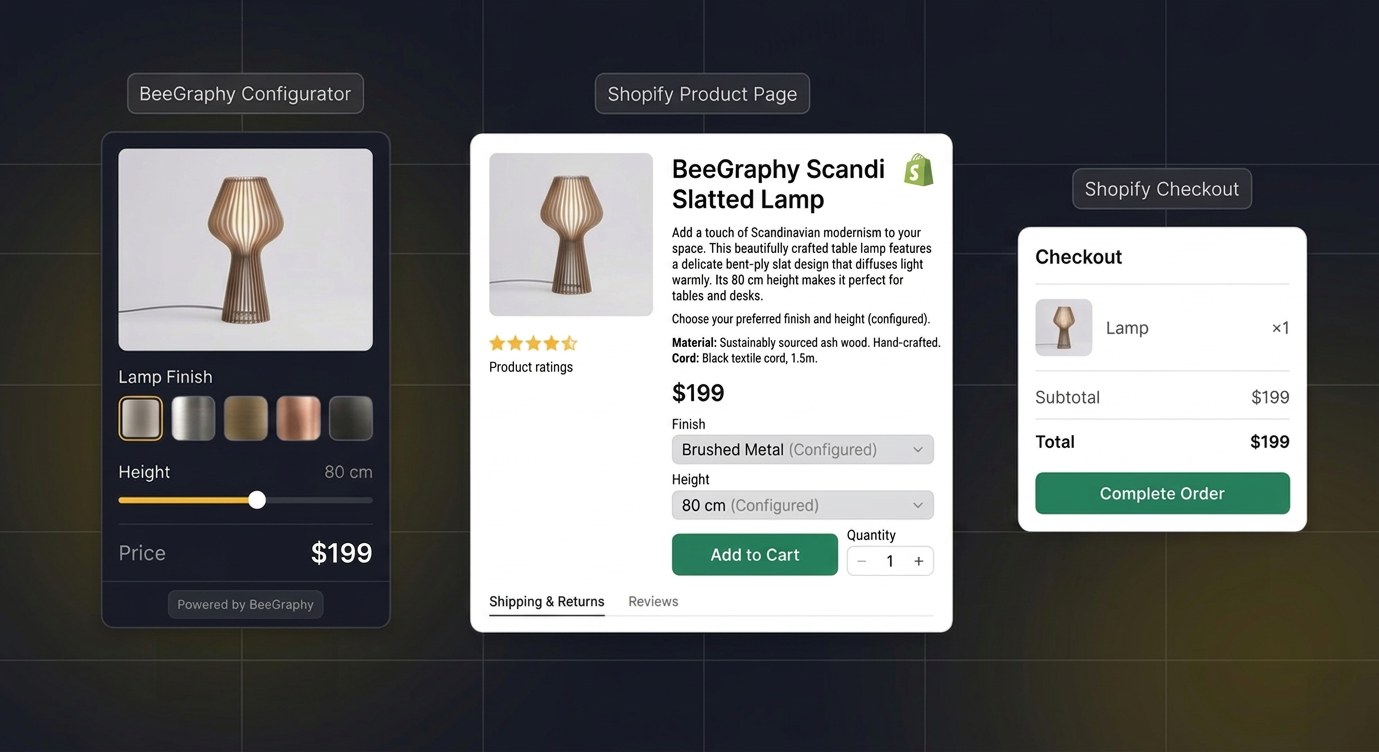
Step-by-Step: Adding a BeeGraphy Configurator to Your Shopify Store
BeeGraphy, the engine behind Configurator.tech, released an update in December 2025 that enables direct embedding on Shopify, WooCommerce, Squarespace, and Etsy. Here is how to set it up on Shopify:
1. Build your configurator
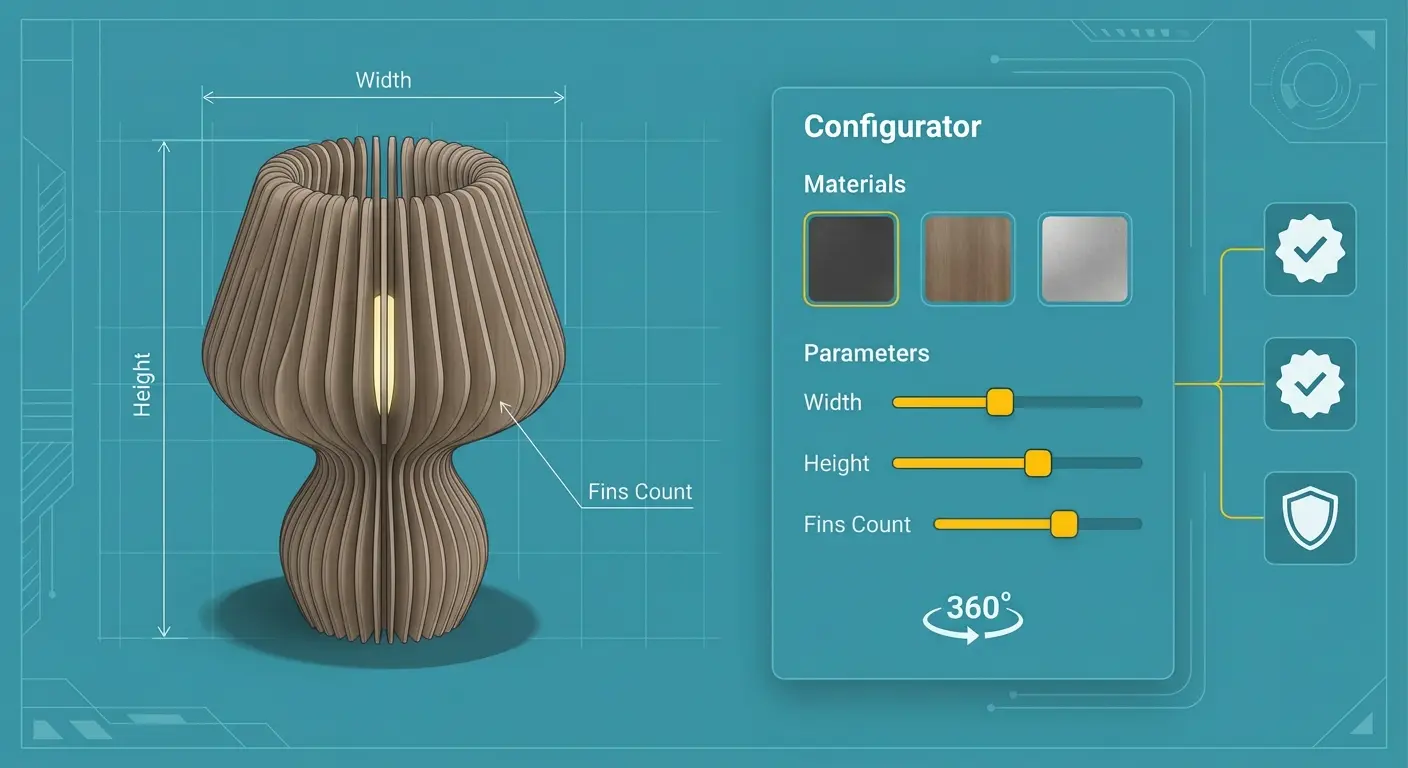
Start by creating your configurable product model in BeeGraphy's no-code editor. Define the parameters your customers can adjust — dimensions, materials, finishes, add-on components — along with pricing rules and any constraints (for example, a table width cannot exceed 300 cm). You can start from scratch or use one of the prebuilt configurator templates available on Configurator.tech.
2. Generate your embed code
Once your configurator is ready, BeeGraphy provides a simple embed snippet — an iframe or JavaScript widget — that you can drop into any webpage. The embed code handles rendering, user interaction, and data capture without requiring any backend changes on your end.
3. Add the configurator to Shopify
In your Shopify admin, navigate to the product page or a custom landing page where you want the configurator to appear. Use Shopify's theme editor to add a "Custom HTML" or "Custom Liquid" section, then paste the embed code. Alternatively, if you are using Shopify's app ecosystem, you can install a compatible integration that connects BeeGraphy directly to your product catalog and checkout flow.
4. Connect to checkout
When a customer finishes configuring their product, the configurator passes the selected options, final price, and a visual snapshot to Shopify's cart. The customer checks out through the standard Shopify flow they already trust, while you receive a detailed order specification on the backend.
5. Test and publish
Preview the page, test the full configuration-to-checkout journey, verify pricing logic, and publish. The entire process typically takes less than a day for simple products and a few days for complex multi-parameter models.
What You Can Configure
A product configurator is only as useful as the customization options it supports. With BeeGraphy and Configurator.tech, the range is extensive:
- Materials and finishes: Let customers switch between wood species, metal types, fabric swatches, or paint colors and see the change reflected instantly in a 3D preview.
- Dimensions: Allow adjustable width, height, depth, or diameter with real-time visual updates — essential for furniture, cabinetry, and architectural products.
- Colors and textures: Apply photorealistic textures so customers can evaluate how walnut looks versus oak, or matte versus glossy.
- Pricing rules: Define dynamic pricing that recalculates automatically as the customer changes parameters. Larger dimensions, premium materials, or additional features increase the price transparently.
- Bill of Materials (BOM) output: Every configuration automatically generates a production-ready BOM, detailing the exact components, quantities, and specifications needed to manufacture the item. This bridges the gap between sales and production with zero manual data entry.
These capabilities apply across furniture, jewelry, home decor, modular construction, and any other industry where products are made to order.
Real Results: What the Data Shows
Adding a configurator is not just a nice UX improvement — it delivers measurable business outcomes. Research from Threekit shows that 3D and AR product visualization can increase e-commerce conversion rates by up to 250%. When customers can interact with a product, rotate it, change its properties, and see it in their own space, they buy with far greater confidence.
The impact on returns is equally significant. BeeGraphy reports that merchants using their configurator see a 2.5x increase in conversions and a 35% reduction in product returns. Returns on customized goods are especially costly because personalized items often cannot be resold. Reducing that return rate by a third directly protects your margins.
These numbers make the ROI case clear. For a Shopify store doing $50,000 per month in custom product sales, a 2.5x conversion lift and 35% fewer returns could translate into tens of thousands of dollars in additional monthly revenue and saved costs. The configurator pays for itself rapidly.
Getting Started with Configurator.tech
If you are ready to bring interactive product configuration to your Shopify store, Configurator.tech is the fastest path to get there. The platform offers prebuilt configurator templates across popular product categories so you do not have to start from zero. Browse templates for furniture, jewelry, cabinetry, and more, then customize them to match your product line and brand.
For businesses evaluating cost, the pricing page breaks down plans based on your needs — from early-stage stores testing the waters to established brands processing hundreds of custom orders per month. And if you have questions about integration, custom requirements, or want a guided walkthrough, the contact page connects you directly with the team.
Shopify gives you the storefront. A product configurator gives your customers the experience they actually want — the ability to design exactly what they need, see it in real time, and buy with confidence. The tools exist today, the integration is straightforward, and the data shows it works. The only question is how soon you want to start capturing those higher conversions and fewer returns.